Update to a new version or branch
Build yourself instead of download
AAPS is not available to download, due to regulations concerning medical devices. It is legal to build the app for your own use, but you must not give a copy to others! See FAQ page for details.
Important notes
Please update to the new version of AAPS as soon as possible after a new release is available.
When a new release is available, in the AAPS app itself, you will receive an information banner about the new version.
The new version will also be announced on Facebook at the time of release.
Following the release, please read the Release Notes in detail, and clarify any queries with the community on Facebook or Discord, before proceeding with the update.
Update AAPS with browser build
If you already built your AAPS app with the Browser Build method, follow these instructions.
Update AAPS with a computer
Follow these instructions..
Check AAPS version on phone
After you installed the new apk, you can check the AAPS version on your phone by clicking the three dots menu on the top right and then About. You should see the current version.
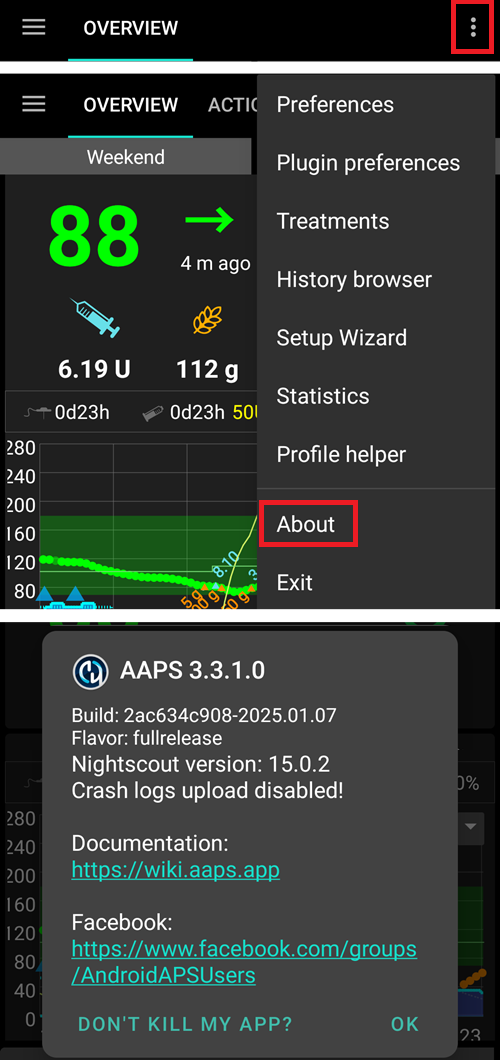
Check in the Release Notes if there are any specific instructions after update.